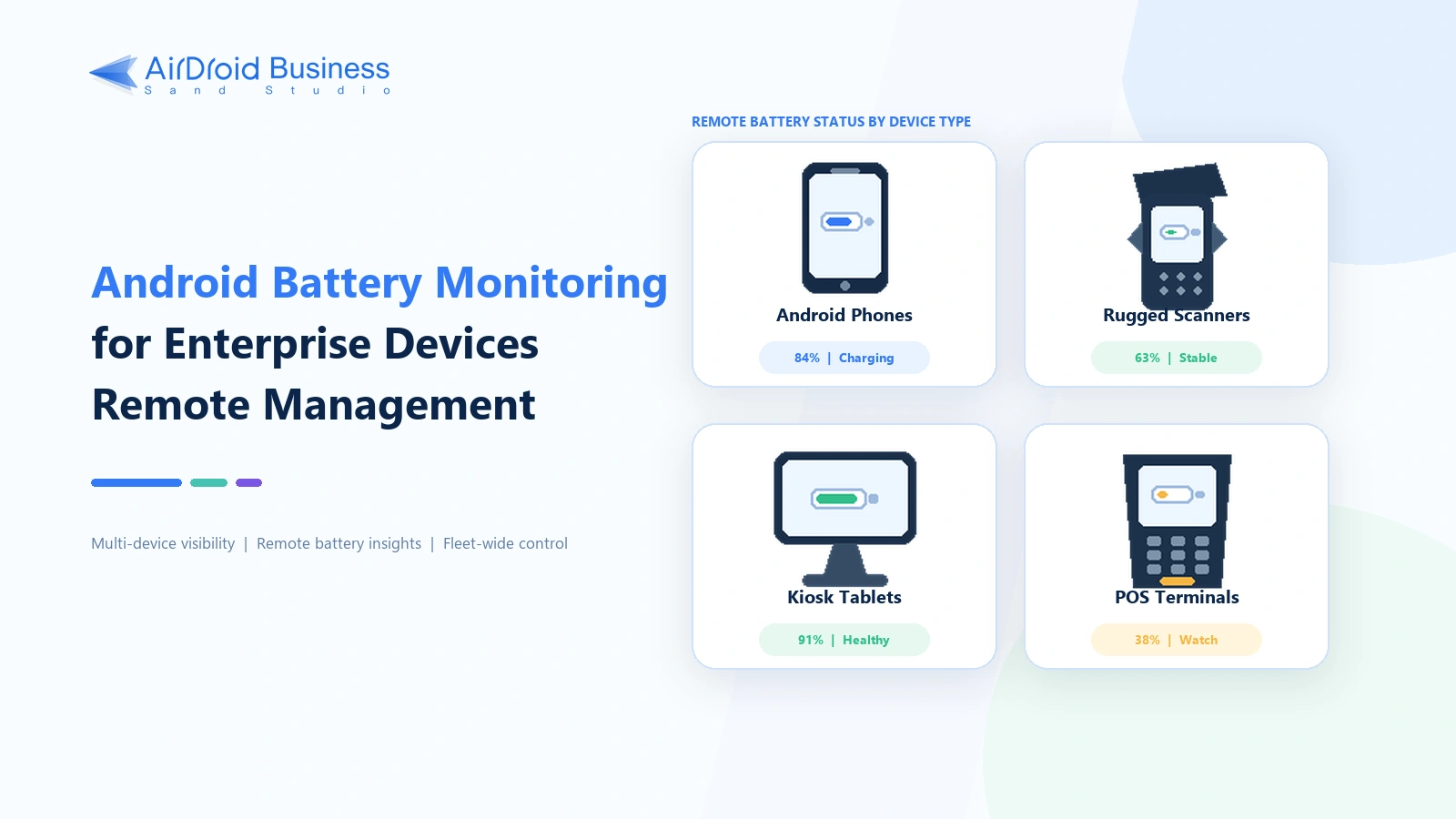
Android Battery Monitoring for Enterprise Devices Remote Management
On a personal phone, built-in settings or an Android battery monitor app usually provides enough information to check the battery. The situation is different in a business deployment. A low battery, overheating, or a charging failure on a delivery terminal, warehouse scanner, POS device, kiosk tablet, or field device can interrupt orders, navigation, scanning, payments, and unattended services.
Companies that manage many devices need MDM battery monitoring. It lets IT teams check battery level, temperature, and charging status from one place, then use alerts and workflows when a device needs attention.
- Part 1 : Battery monitor apps vs. enterprise MDM
- Part 2 : How can individuals monitor an Android phone battery?
- Part 3 : How can enterprises monitor Android device batteries?
- Part 4 : Using AirDroid Business for remote Android battery monitoring
- Part 5 : Enterprise Android battery monitoring use cases
- Part 6 : Conclusion
1Battery monitor apps vs. enterprise MDM
Android settings, battery monitoring apps, and enterprise mobile device management platforms all show battery information, but they are built for different jobs. The practical choice depends on the number of devices, whether staff need remote access, and what should happen after the system detects a problem.
| Comparison item | Android native settings | Battery monitor app | Enterprise MDM |
|---|---|---|---|
| Best for | Individual users | Users who want more detailed data from one device | IT administrators and enterprises |
| Device count | One device | Usually one device | Multiple devices or an entire fleet |
| How to check | Locally on the device | Locally on the device | Remotely from a unified console |
| Main data | Current charge level and app battery usage, plus health information on some models | Estimated capacity, charging and discharging history, temperature, and battery drain analysis | Current charge level, battery temperature, charging status, and other device status |
| Remote and multi-device management | Not supported | Usually not designed for centralized enterprise management | Supported |
| Alerts, workflows, and reports | Limited | Mainly local alerts and history for one device | Remote alerts, automated responses, and centralized reports |
Native settings or an Android battery monitor app make sense when you only need to check one phone. Enterprise MDM is the better fit when you need to monitor multiple Android devices remotely and connect battery alerts to an operational response.
2How can individuals monitor an Android phone battery?
Start with Settings > Battery. The exact menu name varies by manufacturer and Android version, but the page normally shows the current charge, estimated time remaining, app battery usage, and power-saving options. Some newer Pixel, Samsung, and other devices also include battery health or diagnostic information.
If the built-in page does not show enough detail, a third-party app can estimate battery capacity, record charging and discharging sessions, examine background drain, or send charging reminders.
| App | Main capabilities | Best use case | What to know |
|---|---|---|---|
| AccuBattery | Capacity estimates, charging history, power usage analysis, and charging alerts | Tracking changes on one phone over time | Battery health is an estimate that improves as the app collects more charging data. Its alert does not physically stop charging. |
| Battery Guru | Temperature, voltage, current, and charging status monitoring | Watching the charging process and temperature changes | The available data may differ by device and Android version. |
| GSam Battery Monitor | App power usage, historical activity, and customizable alerts | Finding apps that use unusually large amounts of power | Some detailed readings may require extra permissions. |
For more single-device options, read our comparison of Android battery monitor apps.
3How can enterprises monitor Android device batteries?
Why enterprises monitor Android device batteries
The immediate purpose of enterprise device battery monitoring is to keep the fleet available during working hours. Predicting how many years a battery may last is a separate concern. A company may be responsible for phones, tablets, rugged handhelds, POS devices, kiosk tablets, and unattended equipment at the same time. Once those devices are spread across several locations, checking them by hand is no longer practical.
Battery problems can interrupt work in several ways:
- A driver's phone or delivery handheld loses power during a route, stopping navigation, proof of delivery, or order synchronization.
- A warehouse scanner is not charged before the next shift, which delays picking and inventory counts.
- A mobile POS device shuts down during checkout and interrupts a sale.
- A kiosk or unattended terminal overheats and may throttle, shut down, or go out of service.
- A device is connected to power but never enters a normal charging state.
AirDroid Business - Monitor Android Device Batteries from One Console
Track battery level, temperature, and charging status across your Android fleet, then use alerts and workflows when a device needs attention.
Which battery metrics should enterprises monitor?
At fleet scale, Android Battery Monitoring normally starts with the current charge level, battery temperature, and charging status.
| Metric | What it detects | Potential risk | Possible response |
|---|---|---|---|
| Battery capacity or charge level | Devices with a low current charge | Shutdown or loss of connectivity during a task | Charge the device, reassign the work, or issue a spare |
| Battery temperature | High or sustained temperature | Throttling, shutdown, or hardware wear | Check the environment, charger, and workload. Power off the device if needed. |
| Charging status | A device that is not charging as expected | The device may not be ready for the next shift | Check the power source, cradle, cable, and port |
Battery capacity or charge level usually means the percentage that Android currently reports. That number is not automatically the same as physical battery health, maximum remaining capacity, or cycle count.
4Using AirDroid Business for remote Android battery monitoring
AirDroid Business provides a centralized console of enrolled Android devices. An administrator can open a device record from the Device List to see its current battery information. Device Inventory shows battery capacity, temperature, and charging status across the fleet and can filter the devices that need attention.
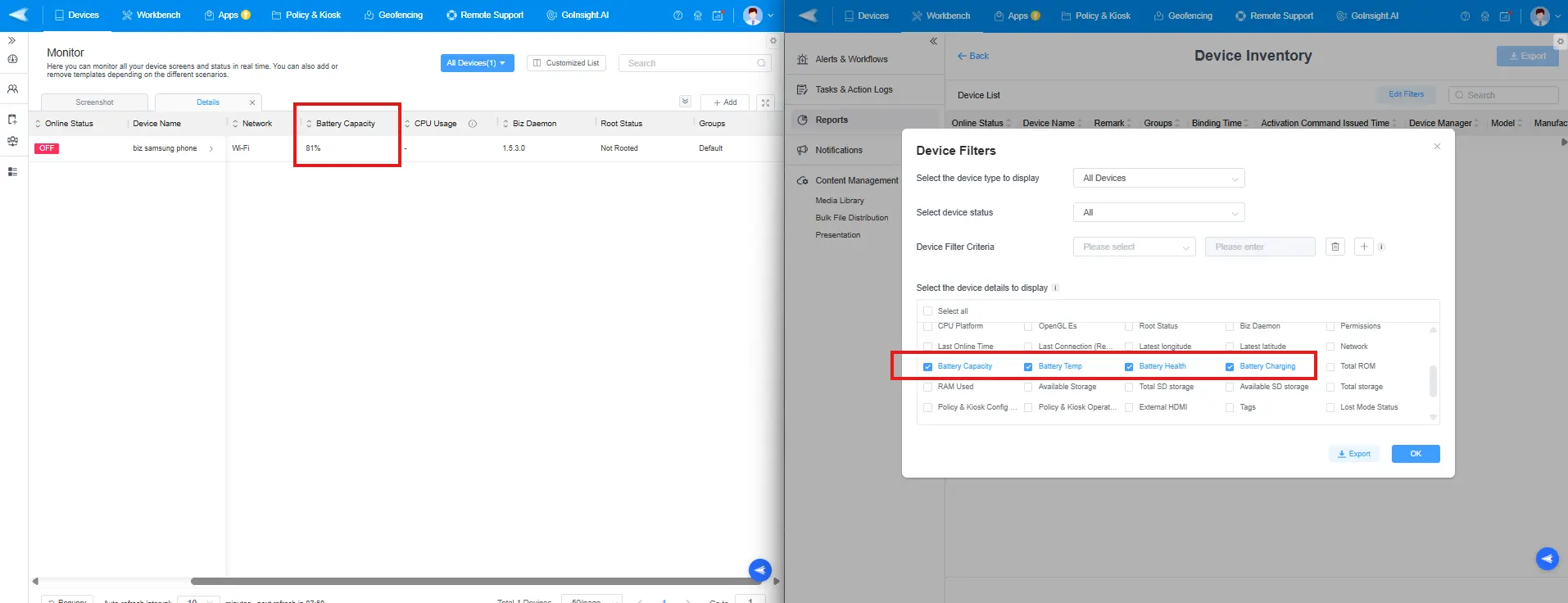
This works for spot checks and scheduled audits. It becomes harder to rely on manual review as the fleet grows because an administrator cannot watch the console all day. Remote Android battery monitoring is more useful when alerts detect an abnormal reading and a workflow coordinates the response.
Setting up battery alerts and automated workflows
AirDroid Business Alerts & Workflows can monitor Battery Capacity, Battery Charge Status, and Battery Temperature. A company can begin with a basic alert. If the response involves several people or systems, it can connect that alert to an AI-assisted workflow for assignment, action, recovery checks, and incident records.
1Configure basic alerts and responses
- Sign in to the AirDroid Business Admin Console and open Alerts & Workflows from Workbench.
- Select + Alerts & Workflows, then choose Battery Capacity, Battery Charge Status, or Battery Temperature.
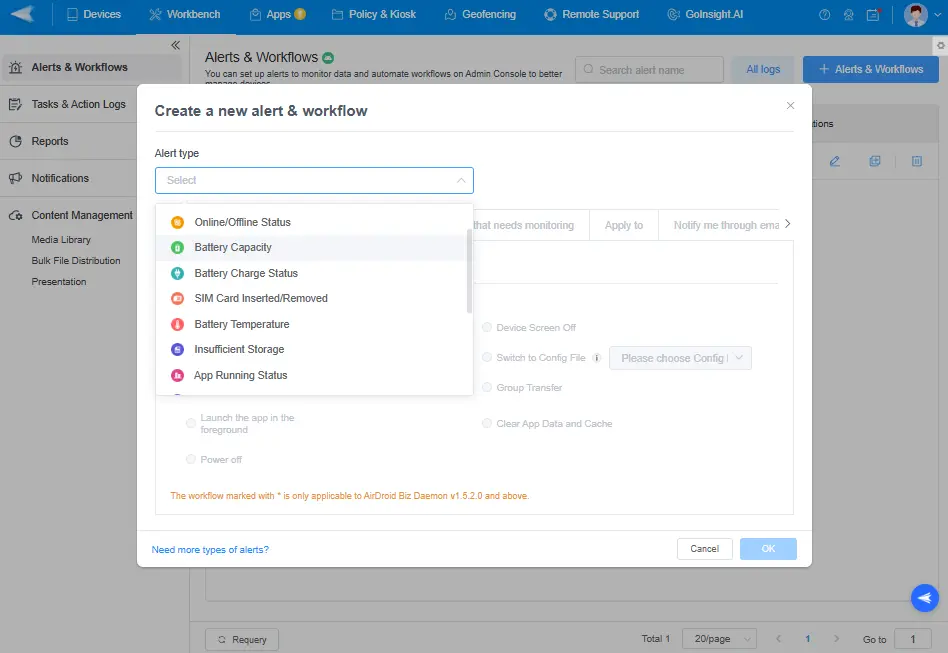

- Set the trigger and check frequency. Choose the devices or device groups that the rule should cover.
- Choose the email recipients and notification frequency. Decide whether IT, a site manager, or the device user should respond first.
- Add any permitted automatic actions that match the business risk. Depending on the alert, device, and product version, these may include sending a notification, turning off the screen, rebooting the device, moving it to another group, or switching a configuration.
- Save the rule. Check the alert log for the affected device, trigger time, action result, and any recorded failure reason.
Basic workflows suit predictable events with lower operational risk. If a delivery terminal drops below 20%, for example, the workflow can notify the driver and dispatcher. If a warehouse device is not charging, it can ask the shift supervisor to inspect the cradle and prepare a spare.
2Build an AI-assisted battery incident workflow
A larger Android fleet can produce too many notifications, unclear ownership, and scattered response records. When a deployment includes AirDroid Business InsightFlow capabilities, the workflow can handle the response in this order:
- Add policies to the knowledge base: Upload device classification rules, alert response policies, ownership rules, and escalation criteria to Workspace Documents. Add a Knowledge Retrieval node so the workflow refers to the latest approved guidance.
- Collect alert context: Use a Service Flow or Interactive Flow to import the Device Information Query template. Collect the device ID, site, battery level, temperature, charging status, device history, recent configuration changes, and related incidents.
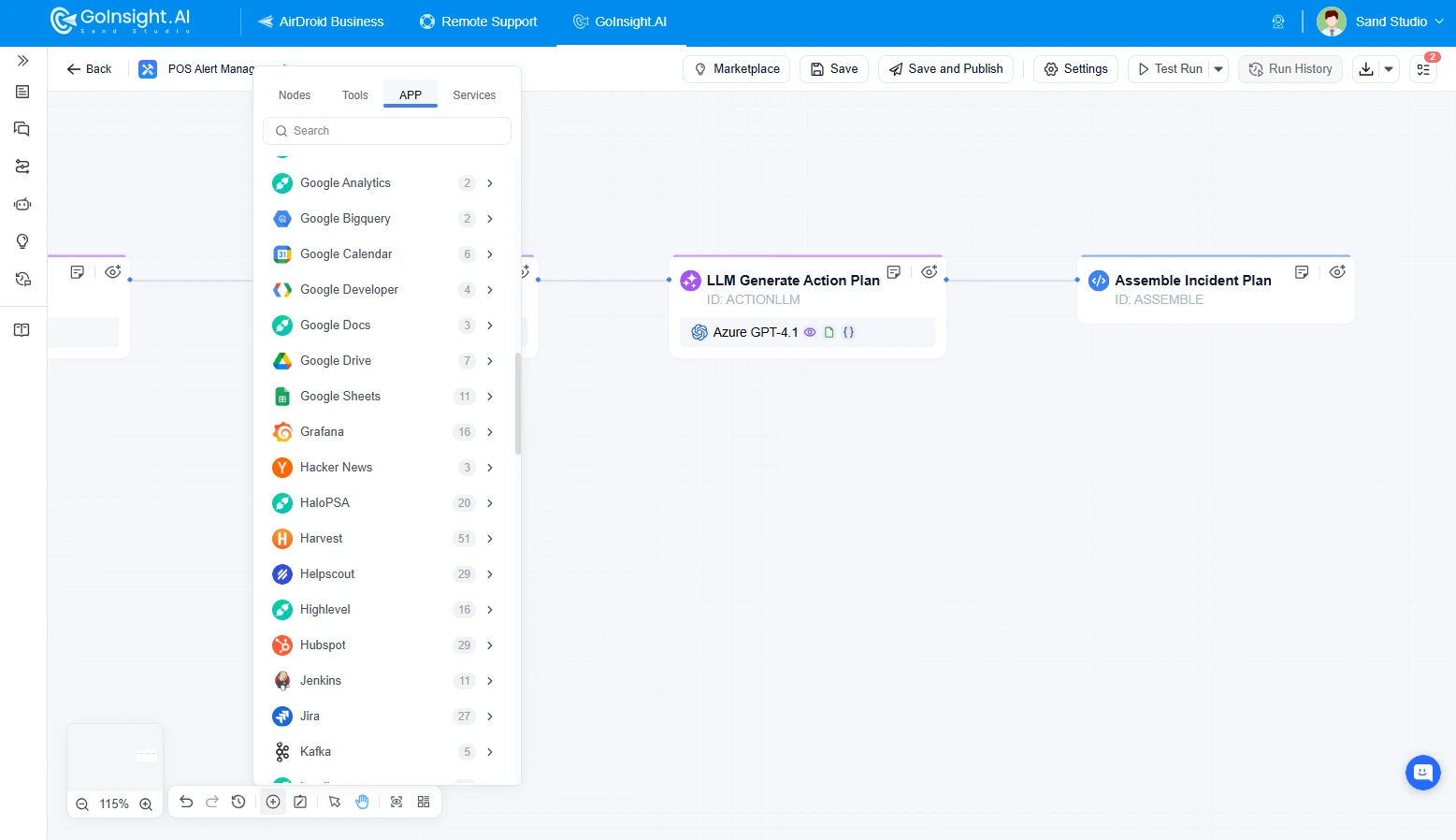
- Generate a standardized response plan: Add an LLM node to assess priority using the device role, affected scope, and business hours. The node can then identify the owner and recommend the next steps.
- Require approval for higher-risk actions: Place a human-in-the-loop approval node before shutdowns, reboots, factory resets, or other actions that may interrupt important operations.
AirDroid Business - Automate Battery Alert Response
Connect battery alerts to assignment, approved actions, recovery checks, ticketing, and traceable incident records across your managed device fleet.
3Connect collaboration and ticketing systems
Once the workflow has an incident summary, owner, and recommended actions, it can send that information to the systems the company already uses. These may include email, messaging, ticketing, spreadsheets, CRM, or asset management software. The workflow can create a ticket, notify the responsible person, and update the incident record without requiring someone to copy the details between systems.
4Check recovery and record the incident data
An action running successfully does not prove that the device has recovered. After a defined wait, the workflow can check the battery level, charging status, temperature, device connectivity, or the status of a critical app again.
- If every recovery condition passes, update the incident to Recovered and close or resolve the related ticket.
- If the device has not recovered, escalate it to the next support tier or schedule on-site service.
- Record the event time, device, abnormal condition, owner, actions, approval history, recovery result, and resolution time. These records support SLA reporting and root-cause analysis.
A weekly or monthly review can show which device models repeatedly run low, which sites have recurring charging failures, how often automated responses work, and which incidents require human intervention. Teams can use those findings to adjust thresholds, charging procedures, and device replacement plans.
Automation cannot charge a device or repair its battery. Frequent checks may also use more power and data, so the check interval has to balance response time, device resources, and alert volume. For setup instructions, see the AirDroid Business Alerts & Workflows guide.
5Enterprise Android battery monitoring use cases
Logistics and delivery
- Devices: Driver phones, delivery handhelds, and vehicle-mounted terminals.
- Battery risk: A device loses power during a route and interrupts navigation, order synchronization, proof of delivery, or customer communication.
- Alert condition: A company-defined low-battery threshold, such as below 20%. Temperature thresholds should follow the manufacturer's guidance and the actual operating environment.
- Response: Notify the driver and administrator, prompt the driver to charge at the next stop, and adjust the assignment or provide a spare when needed.
- Expected outcome: Fewer unexpected shutdowns, delivery delays, and on-site support requests.
Warehousing and field service
- Devices: Barcode scanners, rugged handhelds, warehouse tablets, and field-service tablets.
- Battery risk: A device is not charged before the next shift or drains quickly under a heavy workload or high temperature. Scanning, inventory, or work-order processing may be delayed.
- Alert condition: Low charge, a not-charging state, or abnormal temperature. Critical equipment can use a narrower device scope and stricter notification rules.
- Response: Notify the warehouse supervisor or IT team, return the device to the charging area, inspect the cradle, or assign a spare.
- Expected outcome: Better device availability at shift changes and fewer task delays caused by endpoint failures.
6Conclusion
Built-in settings or an Android battery monitor app can handle a single phone. Enterprises that manage many Android endpoints have a different problem: they need to detect battery exceptions remotely, notify the responsible person, and keep a record of the response.
AirDroid Business lets IT teams monitor battery level, temperature, and charging status from a central console. Alerts & Workflows can then handle supported notifications and responses without relying on continuous manual checks.
Teams that manage Android POS devices, kiosks, handhelds, delivery terminals, or field devices across several locations can explore AirDroid Business to reduce device downtime and keep incident handling traceable.
AirDroid Business - Keep Your Android Device Fleet Available
Monitor battery conditions remotely, respond to exceptions faster, and keep battery incident handling traceable across business-critical Android devices.
FAQs











Leave a Reply.