Common Windows Remote Access Problems in Enterprise Environments
Remote access is essential in Windows-based organizations. IT teams depend on it to support users and keep systems running across offices, stores, factories, and campuses.
In real enterprise environments, however, Windows remote access is often unreliable. Connections fail, sessions become unstable, or access behaves inconsistently across users and locations. These issues are rarely caused by a single mistake. More often, they result from how networks, permissions, workloads, and security controls interact at scale.
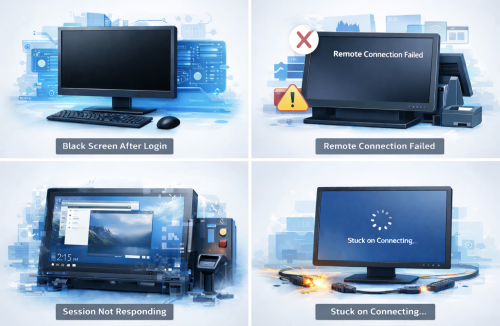
1Why Windows Remote Access Breaks Down at Scale
Many IT teams encounter the same pattern over time.
Remote access works as expected during testing or initial rollout. Once deployed more broadly, reliability begins to decline. Connections succeed in some locations but fail in others. Performance degrades during peak hours even though no obvious configuration changes were made.
These situations are difficult to diagnose because they rarely point to a single failure point. In practice, Windows remote access problems tend to surface only when systems are used at scale, across multiple locations, and under real operational conditions.
2The Most Common Windows Remote Access Problems in Enterprise Environments
Connectivity and Network Barriers
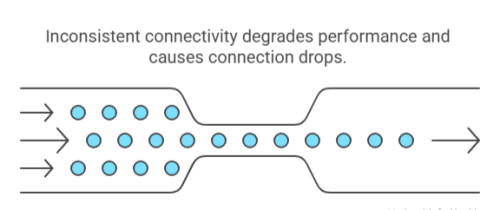
Some Windows remote access problems fail at the very first step, when the device cannot be reached at all. Firewalls, network segmentation, NAT rules, or VPN restrictions may block access before a remote session begins, leaving users with timeouts or vague connection errors. To end users, this often appears as remote desktop won’t connect, with little indication of where the failure occurred.
In other cases, access is technically successful but unreliable in practice. Sessions connect, yet performance quickly degrades. Screen updates lag, input feels delayed, or connections drop unexpectedly due to long network paths, regional latency, or inconsistent connectivity. As organizations operate across more locations, these stability issues tend to appear more frequently and become harder to trace to a single cause.
Authentication and Permission Conflicts
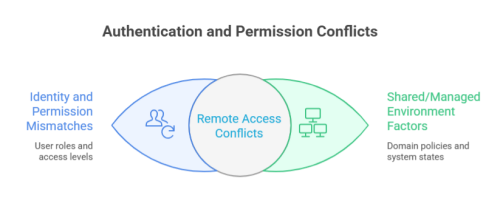
Many Windows remote access issues originate from identity and permission mismatches rather than connection failures. Domain policies, local accounts, and group memberships can behave differently depending on how and where a user signs in, resulting in situations where the same setup works for one user but fails for another.
These problems become more visible in shared or managed environments. Remote sessions may disconnect active local users, block additional logins, or trigger remote desktop errors that provide little insight into whether the issue is related to permissions, system state, or access context. As organizations introduce more user roles and access levels, remote access often exposes permission conflicts that were previously hidden during normal use.
Performance and Stability Issues
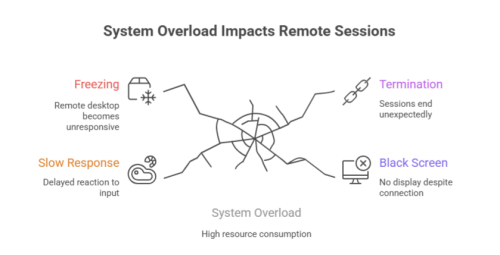
Some remote sessions fail not because access is blocked, but because the system struggles to remain responsive. Windows devices under active workload may react slowly to remote input,experience remote desktop freeze scenarios , or terminate sessions under pressure, giving users the impression that the connection itself is unreliable.
This behavior is especially common on Windows devices with operational responsibilities. POS terminals, industrial PCs, and classroom systems frequently run continuous processes that compete for system resources. In some cases, sessions connect successfully but display a black screen in remote desktop sessions, leaving users unable to interact with the system even though the connection itself remains technically active.
Security Exposure and Risk Concerns
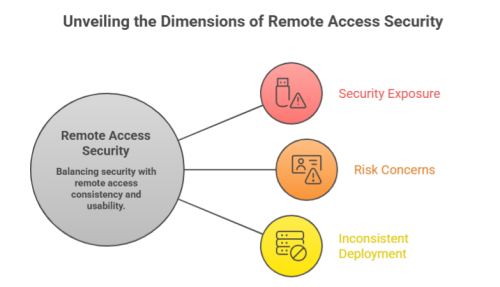
Security considerations often shape how and where remote access is allowed, sometimes at the cost of consistency. Exposed ports, weak credentials, and limited monitoring increase the risk of unauthorized access, prompting many organizations to restrict or tightly control remote connectivity.
Over time, these restrictions can lead to uneven deployment. Some devices allow remote access while others do not, or access is enabled temporarily and left partially configured. This patchwork approach makes remote access behavior unpredictable and complicates both troubleshooting and governance.
3Why These Issues Are Harder to Avoid in Business Environments
Windows remote access problems tend to intensify as environments grow more complex.
Organizations manage large numbers of devices with different roles, workloads, and operating conditions, distributed across offices, branches, production floors, and remote sites. Each environment introduces its own network constraints, access policies, and operational demands.
Unattended access requirements further increase complexity. Devices must remain reachable outside business hours or without local users present, placing additional strain on authentication, connectivity, and security controls. As policies diverge and configurations drift, small inconsistencies accumulate, turning isolated issues into systemic challenges.












Leave a Reply.