Windows Unattended Access: What It Means for IT Operations
Windows unattended access has become a critical requirement for modern IT operations. As organizations manage more Windows devices across stores, factories, campuses, and remote employees, the ability to access systems without local user interaction is no longer optional.
Many teams discover this need only after remote access breaks at the worst possible time. A device is powered on, but no one is logged in. An update completes overnight, and remote connections fail. A kiosk freezes outside business hours, and support cannot connect without someone on-site.
This article explains what Windows unattended access really means, why enterprises increasingly depend on it, why native approaches often fail, and how organizations should think about achieving reliable unattended access in 2026.
- Part 1 :What Is Windows Unattended Access?
- Part 2 :Why Unattended Access Is Essential for MSPs, Retail, Remote Work, and More
- Part 3 :Common Windows Unattended Access Problems and Why Native RDP Often Fails
- Part 4 :What True Enterprise-Grade Unattended Access Should Deliver
- Part 5 :How to Achieve Reliable Windows Unattended Access in 2026
- Part 6 :Conclusion
Part 1 : What Is Windows Unattended Access?
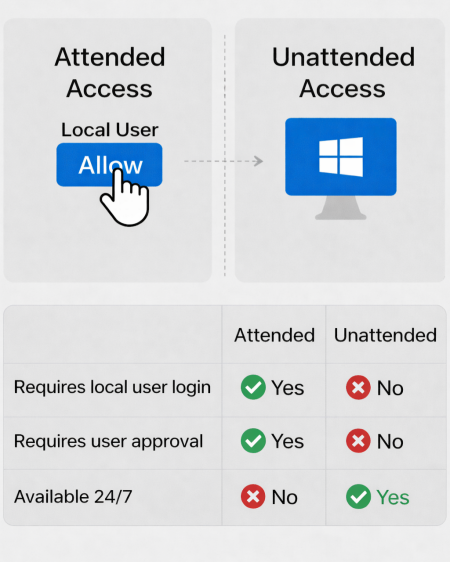
unattended access refers to the ability to connect to a Windows device remotely without requiring any local user interaction.
Windows unattended access refers to the ability to remotely connect to a Windows system without requiring a local user to be logged in or approve the session.
In practical terms, this means:
- Access is available even at the Windows login screen
- No local confirmation or interaction is required
- Sessions can be initiated outside business hours
- Devices can be managed regardless of physical accessibility
This is fundamentally different from attended remote access, which assumes a user is present, logged in, and able to respond. In enterprise environments, that assumption frequently breaks down.
Part 2 : Why Unattended Access Is Essential for MSPs, Retail, Remote Work, and More
Unattended access becomes indispensable when systems are expected to stay operational, but people are not always available to intervene.
1 MSPs Managing Customer Environments
Managed service providers often support hundreds or thousands of Windows devices across many client organizations. These systems operate on different schedules and are rarely monitored by end users around the clock.
When alerts trigger or incidents occur, waiting for a client employee to log in and approve access delays response and threatens service-level agreements. In MSP operations, unattended access is what allows technicians to diagnose issues, apply fixes, and restore services immediately.

2 Retail, Kiosk, and Front-Line Systems
Many front-line business systems run on Windows but operate without dedicated IT staff nearby. POS terminals, self-service kiosks, and back-office machines often run long hours, including nights and weekends.
When a checkout terminal freezes or a kiosk stops responding, there may be no trained staff on-site to assist. Waiting until someone notices the problem can mean lost transactions and frustrated customers. Unattended access allows IT teams to intervene as soon as issues surface, regardless of store hours.

3 Remote and Hybrid Workforces
In distributed work environments, employee devices are often outside the corporate network. When login failures, VPN issues, or security misconfigurations occur, users may be unable to grant access at all.
If remote support depends on user approval, IT teams are blocked precisely when help is needed. Unattended access enables troubleshooting even when employees are unavailable, offline, or unable to complete basic login steps.

4 Special-Purpose or Shared Windows Devices
Industrial PCs, lab machines, training stations, and shared workstations are often not tied to individual user identities. These devices may remain logged out or run under generic accounts.
In such environments, attended access is unreliable. Unattended access allows administrators to maintain systems, apply updates, and resolve issues without disrupting workflows or requiring physical presence.

Part 3 : Common Windows Unattended Access Problems and Why Native RDP Often Fails
In theory, Windows supports remote access natively. In practice, unattended access on Windows systems frequently breaks under real deployment conditions.
1 Login-Screen Access Fails After Reboots or Logouts
A common complaint is that remote access works only after someone logs in locally. After a reboot or logout, services may not initialize correctly, leaving the device unreachable at the login screen.
This issue is widely reported with native RDP and some third-party tools, especially after updates or power interruptions.
2 Windows Updates Break Previously Working Setups
Recent Windows 11 updates have introduced recurring problems, including:
- * RDP black screens
* Connection failures after cumulative updates
* UDP transport issues causing unstable sessions
Settings may appear unchanged, yet remote access stops working until services, permissions, or policies are manually reconfigured.
3 NLA and MFA Conflicts Disable Unattended Access
Network Level Authentication improves security but often conflicts with unattended scenarios. When combined with MFA or strict identity policies, unattended access can fail entirely because no interactive login is possible.
This forces teams into insecure workarounds or manual intervention.
4 Network Profile and Firewall Changes Block Access
Windows may silently switch network profiles after updates or environment changes. Firewall rules tied to specific profiles no longer apply, and RDP or remote services stop listening on expected ports.
From an administrator’s perspective, the device appears online but unreachable.
5 RDP Permissions and Group Membership Reset
Windows updates or domain policy refreshes can reset RDP-related permissions. Users or service accounts that previously worked lose access without clear error messages.
This is especially disruptive at scale, where revalidating permissions across many devices is time-consuming.
6 Resource Contention on Operational Devices
On POS systems, kiosks, and industrial PCs, unattended access competes with continuous workloads. Session creation, service restarts, or driver reloads can destabilize systems already under load.
Remote access technically succeeds, but performance degrades or sessions terminate unexpectedly.
Part 4 : What True Enterprise-Grade Unattended Access Should Deliver
At scale, unattended access is not a feature toggle. It is an operational capability.
Reliable enterprise-grade unattended access typically requires:
✅ Consistent access before user login
✅ Secure authentication without shared passwords
✅ Clear separation of roles and permissions
✅ Full session logging and auditability
✅ Centralized deployment and policy management
Without these elements, teams rely on brittle configurations that break under change.
Part 5 : How to Achieve Reliable Windows Unattended Access in 2026
Organizations generally evaluate three paths:
1 Native RDP (With Limitations)
RDP can support unattended access in controlled environments with careful configuration. However, it remains sensitive to updates, session state, and network changes. At scale, reliability becomes difficult to maintain.
2 Third-Party Remote Access Tools
Tools such as AnyDesk, RustDesk, Splashtop, and TeamViewer offer more flexibility around login-screen access and device management. Enterprise suitability depends on support for centralized deployment, auditing, and identity controls.
3 Identity-Based and Zero Trust Approaches
Modern enterprise solutions increasingly rely on identity-first access models. These approaches avoid exposing RDP ports, reduce dependency on VPNs, and allow access policies to scale with organizational structure rather than network topology.
When evaluating options, organizations should assess:
✅ Login-screen access support
✅ Compatibility with MFA and identity providers
✅ Session recording and audit logs
✅ Ability to deploy and manage access at scale
✅ Independence from shared credentials
Conclusion
Windows unattended access has become a practical necessity in modern enterprise environments. As device counts grow and work becomes more distributed, relying on attended sessions or manual intervention is no longer sustainable.
Most unattended access failures are not caused by tools alone, but by access models that were never designed for scale, updates, and identity complexity. Understanding these limitations is the first step toward building more reliable and predictable remote access across Windows systems.











Leave a Reply.