The Enterprise Guide to Choosing a Windows Remote Access Solution
This article helps enterprises choose a Windows remote access solution based on how their organization actually operates.
There is no universal “best” tool. The right solution depends on your business structure, the devices you manage, how access is used in daily operations, and the level of security and control required. Rather than comparing products by features alone, this guide provides a decision framework based on real enterprise environments and common deployment patterns.
Step 1 : Define Your Organization Type
Remote access requirements change significantly depending on how your organization is structured.
A single-office company with a small IT team typically operates within one network and supports a limited number of users. In this case, access models are simpler and easier to control.
Multi-location enterprises must handle different network conditions, user roles, and device types across branches or regions. MSPs introduce an additional layer of complexity because they manage multiple independent customer environments, each with its own security policies.
| Organization type | Typical structure | Main challenge |
|---|---|---|
| Single-office | One network, limited users | Extending access beyond the office safely |
| Multi-location | Multiple sites and networks | Keeping access consistent across locations |
| MSP | Multiple customer environments | Separating and governing access per client |
Before selecting any tool, it is important to clearly identify whether your environment is centralized, distributed, or multi-tenant. This determines how much scalability and policy control your solution must support.
Step 2 : Identify Core Use Cases
Windows remote access is used for different purposes across organizations.
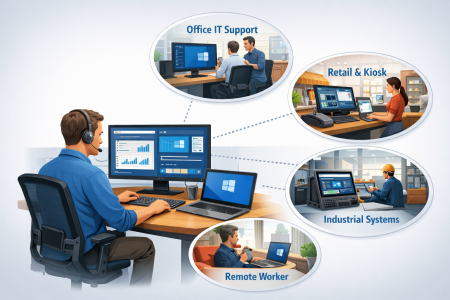
Some teams focus mainly on internal IT support for office desktops and servers. Others manage operational devices such as POS terminals, kiosks, or industrial PCs that are not tied to individual users. Remote and hybrid employees introduce another common use case, especially when troubleshooting must occur outside working hours.
A solution designed for attended IT support may perform poorly when applied to unattended systems or shared devices. Mapping your primary use cases helps avoid choosing a tool optimized for the wrong operational model.
Step 3 : Security and Compliance Needs
Remote access should reflect your organization’s security posture.
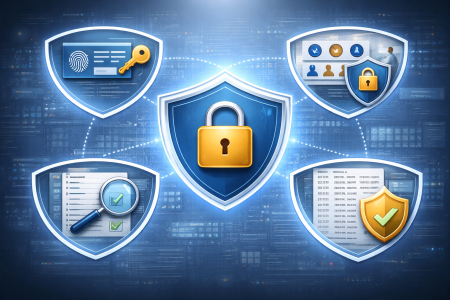
Enterprises typically require identity-based authentication, role-based access control, and session-level logging. In regulated industries, auditability and access traceability are essential for compliance.
Some tools rely mainly on network trust and static credentials. Others integrate with identity systems and apply policy controls per user or device. The difference becomes important when access must be reviewed, restricted, or audited over time.
Security should be evaluated as part of the access architecture, not as an optional add-on.
Step 4 : Is Unattended Access Required?
Unattended access is one of the most critical decision points.
MSPs must resolve incidents without waiting for users to approve sessions. Retail systems and kiosks often fail outside staffed hours. Remote employees may encounter login or VPN issues before they can request help.
In these cases, requiring user presence delays recovery and increases operational risk. If your environment includes shared systems, frontline devices, or off-hours support needs, unattended access is usually a core requirement rather than an optional feature.
Step 5 : Network and Connectivity Constraints
Remote access models differ in how they depend on the network.
Some approaches require VPNs and trusted internal networks. Others rely on brokered or cloud-mediated connections that avoid exposing internal endpoints directly.
Organizations supporting users across offices, homes, and branch locations must consider how stable and manageable access remains under varied network conditions. A solution that performs well inside one network may struggle when extended across regions or external connections.
Evaluating how access is delivered is as important as evaluating what the tool can do.
Step 6 : Scale and Device Management
Remote access complexity grows with device count.
Managing a small number of PCs can be handled manually. Managing hundreds or thousands requires centralized deployment, role-based permissions, and consistent configuration policies.
Tools that depend on individual device setup often become difficult to govern as environments expand. Enterprises benefit from solutions that support batch provisioning, unified policies, and centralized visibility across all endpoints.
Scalability should be assessed from an operational perspective, not just a licensing perspective.
Step 7 : Budget and Operational Overhead
When evaluating a Windows remote access solution, cost should not be measured only by the subscription price.
The license fee is just the starting point. In practice, a solution also creates ongoing costs through the infrastructure it depends on, the time IT teams spend maintaining it, and the business impact when it fails.
Some tools appear inexpensive at first, but require VPN gateways, additional servers, or complex network configurations to function securely. Others demand frequent manual setup, user management, and troubleshooting, which turns into long-term operational workload.
A realistic cost assessment should therefore include:
- What you pay for the software itself
- What supporting infrastructure is required to run it
- How much administrative effort it adds for IT staff
- What downtime or access failures could cost the business
Looking at these factors together provides a more accurate picture of total cost of ownership than comparing license prices alone.
Mapping Needs to Solution Categories
Different types of solutions fit different environments
- Native Windows tools such as RDP with VPN access suit small, stable internal networks.
- Traditional remote desktop software fits mid-sized organizations that need both attended and unattended support without redesigning their infrastructure.
- Modern cloud-native and zero trust platforms suit distributed enterprises and MSPs managing large device fleets with centralized identity and policy control.
The key distinction is not feature breadth, but operational alignment.
Conclusion
Windows remote access is no longer just a support utility. It is part of an organization’s access and device management strategy.
Effective solutions are those that match how the business operates, not those that force the business to adapt to the tool. Choosing a Windows remote access solution is ultimately a decision about long-term scalability, control, and operational stability.










Leave a Reply.