RDP, VNC, and Zero Trust Compared for Business Use
- Part 1 : How Windows Remote Access Differs by Method
- Part 2 : RDP: Session-Based Access Built Into Windows
- Part 3 : VNC: Screen-Level Visibility Without System Context
- Part 4 : Zero Trust Remote Access: Identity-First Access Model
- Part 5 : Choosing the Right Method for Your Business Environment
- Part 6 : Key Takeaways for Business and IT Teams
Most businesses do not run into remote access problems because connections suddenly drop. They run into problems because the access method they chose never matched how the business actually operates.
RDP, VNC, and Zero Trust are often discussed side by side as if they were interchangeable ways to access Windows systems. In practice, they are built on very different assumptions about trust, control, and scale. When organizations treat them as equivalent solutions, they usually end up adding workarounds that increase complexity instead of reducing it.
This article compares how these Windows remote access methods behave in real business environments. The goal is not to rank them by technical strength, but to clarify where each method fits and where it begins to break down.
Part 1 : How Windows Remote Access Differs by Method
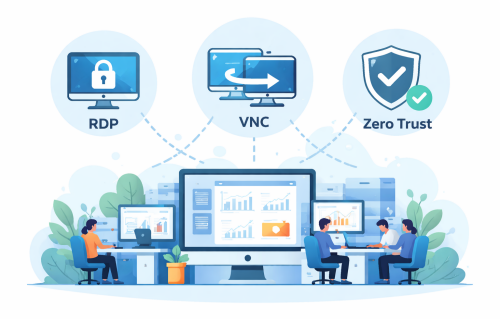
Although RDP, VNC, and Zero Trust all allow remote control of Windows systems, they rely on different access models.
RDP logs a user into a Windows session. VNC mirrors what appears on the screen. Zero Trust verifies identity and context before granting access to specific resources. These differences shape how permissions are handled, how sessions behave, and how well access scales as environments grow.
A method that works smoothly in a small, centralized setup can become fragile when applied across multiple locations, roles, or device types. Understanding these differences upfront helps avoid choosing an access model that conflicts with the way the business operates.
Part 2 : RDP: Session-Based Access Built Into Windows
Remote Desktop Protocol is native to Windows and widely used in corporate IT environments. When a user connects via RDP, they sign into a Windows user session with the permissions and policies tied to that account.
Where RDP Fits Well
- Devices operate inside a trusted network, such as a corporate LAN or VPN
- User roles and access patterns remain stable with limited role changes
- Windows domain policies already define permissions and access control
Where RDP Begins to Break Down
- Multiple users need concurrent or shared access to the same machine
- Unattended access becomes common across locations or time zones
- Remote access expansion depends on growing VPN or gateway infrastructure
Part 3 : VNC: Screen-Level Visibility Without System Context
VNC takes a different approach to Windows remote access by sharing the active screen instead of logging into a user session. The remote user interacts with what is currently displayed on the device, independent of how Windows manages users or authentication.
Where VNC Fits Well
- Devices that do not align with standard Windows authentication models
- Scenarios where seeing the live system state matters more than user identity
- Industrial PCs, kiosks, legacy systems, or shared workstations with fixed usage
Where VNC Loses Manageability
- Access control handled outside the Windows identity and role system
- Limited auditing and visibility into user actions during sessions
- Per-device configuration that becomes hard to govern across many endpoints
Part 4 : Zero Trust Remote Access: Identity-First Access Model
Zero Trust remote access starts from a different assumption. Instead of trusting the network location, each remote session begins with identity verification and policy evaluation before access is granted.
Where Zero Trust Fits Well
- Works well for distributed teams, branch offices, and hybrid work, because access policies stay consistent even when users connect from different networks.
- Better for third-party or contractor access, since permissions can be limited to specific systems and time windows, rather than opening broad network access.
- Strong fit for environments with stricter security requirements, where teams want fewer exposed entry points and clearer control over who can access what.
Where Zero Trust Gets Complex
- Identity and device posture become the core dependency. If accounts, MFA, or device compliance are not well managed, access control becomes inconsistent.
- Policy design takes real effort. Teams need clear role definitions, resource grouping, and rules that stay maintainable as people, devices, and locations change.
- Visibility and operations still matter. Without session logs, alerting, and regular review, “policy-based access” can drift and become hard to audit over time.
Part 5 : Choosing the Right Method for Your Business Environment
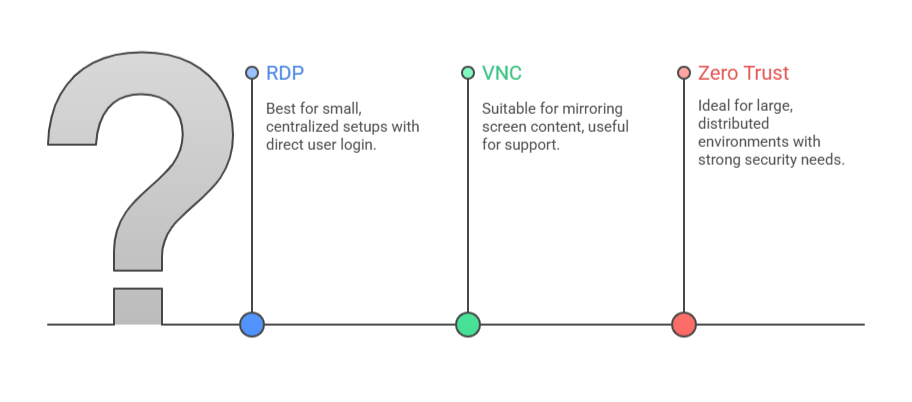
RDP fits organizations operating within stable networks and supporting internal users with predictable access patterns.
It works best when infrastructure and roles change slowly.
VNC is better suited for devices where screen visibility matters more than user identity,
such as industrial equipment or shared systems. It is effective in narrow scenarios but difficult to manage broadly.
Zero Trust aligns with organizations whose access needs extend beyond fixed network boundaries. Distributed teams, contractors, and frequently changing roles benefit from identity-based access that does not depend on where a connection originates.
Most long-term remote access issues arise not from technical failures, but from applying a method outside the environment it was designed to support.
Part 6 : Key Takeaways for Business and IT Teams
RDP, VNC, and Zero Trust are not interchangeable ways to access Windows systems. Each reflects a different approach to trust, control, and scalability.
Reliable Windows remote access comes from matching the access model to the structure of the business, rather than forcing the business to adapt to the tool.










Leave a Reply.