Rugged handhelds are indispensable for modern warehouse operations, powering critical tasks from inventory tracking to order dispatch.
But there is a hidden vulnerability. Scattered across vast, demanding environments, these devices operate far from IT oversight.
The result? Crippling downtime from network dead zones or software failures grinds workflows to a halt. Unchecked device misuse saps productivity and drains resources. Manual updates become a constant drain on IT, breeding inefficiency and security risks.
For warehouse operations demanding peak efficiency, integrating MDM solution is no longer optional - it's essential. MDM acts as the central nervous system, providing the critical oversight needed to manage and secure every device.
1 What Are the Uses of Handheld Devices in Warehouses?
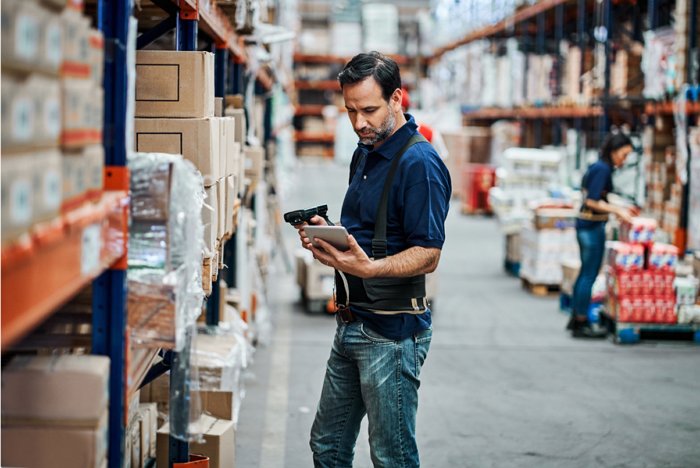
Rugged handhelds empower warehouse staff, from forklift drivers to inventory clerks, to work with precision and speed. They are versatile frontline tools central to core operations:
- Inventory & Asset Management: The foundation of accuracy. Staff scan barcodes/RFID tags, conduct stock counts, track moving assets, and update records instantly. This slashes manual errors and provides real-time stock visibility.
- Order Fulfillment: The engine of throughput. Handhelds guide the entire process: directing pickers to exact locations, verifying packing, generating shipping labels, and capturing proof of delivery – ensuring accuracy from order to dock.
- Communication & Collaboration: The connective tissue. Beyond data, devices enable instant Push-to-Talk (PTT) communication, internal messaging, and task assignment, keeping teams coordinated across vast spaces.
- Quality Control & Compliance: Handhelds enable digital checklists for quality inspections, facilitate real-time data entry for compliance audits, and allow immediate reporting of incidents or discrepancies. This ensures products meet standards and operations adhere to regulations, reducing risks and improving overall quality.
2 What Are the Unique Challenges of Warehouse Device Management?
While indispensable, managing handheld devices in a warehouse setting comes with its own distinct set of challenges that can significantly impact productivity and operational costs.
- Connectivity & Network Reliability: Warehouses are often vast, sprawling environments with metal shelving, large structures, and constantly moving equipment, all of which can interfere with Wi-Fi signals. Maintaining stable network connections across such areas, and dealing with intermittent dead zones, is a persistent challenge. Lost connections mean lost productivity, delayed data synchronization, and frustrated workers.
- Software Update: Critical warehouse applications, such as Warehouse Management Systems (WMS) and Enterprise Resource Planning (ERP) integrations, require frequent updates for new features, performance improvements, and security patches. Manually updating dozens or even hundreds of devices is incredibly time-consuming, labor-intensive, and prone to errors, leading to inconsistencies and potential security vulnerabilities if devices are left outdated.
- Device Misuse: Handheld devices, especially those running Android, offer a wide range of functionalities beyond work-specific apps. Without proper controls, drivers or warehouse staff might use devices for personal browsing, social media, or unauthorized app downloads. This not only incurs additional data costs but also poses security risks, drains battery life, and distracts from core tasks, impacting overall productivity.
- Downtime & Maintenance Costs: Rugged as they are, these devices are still susceptible to damage from drops, spills, or extreme temperatures common in warehouses. Device failure leads to immediate productivity loss, as workers cannot perform their tasks. The costs associated with repairs, replacements, and the logistical nightmare of sending devices out for service can quickly add up, creating significant operational overhead.
- Battery Management: Handheld devices are used continuously throughout long shifts, often 8-12 hours or more. Ensuring that device batteries remain charged for the entire shift, and managing charging stations efficiently, is a constant logistical challenge. A dead battery means an unusable device, leading to interruptions in workflow and a dip in productivity.
3 How Does MDM Streamline Warehouse Operations?
Addressing the complex challenges of warehouse device management requires a robust and centralized solution.
AirDroid Business MDM stands out as a comprehensive Mobile Device Management platform designed to streamline the deployment, management, and security of rugged handheld devices in demanding environments.
It transforms operational headaches into seamless efficiency through its powerful features:
- Network Policy Application: To combat inconsistent connectivity, AirDroid Business MDM allows administrators to remotely configure and enforce network policies. This ensures devices maintain stable and secure connections by setting preferred Wi-Fi networks, VPN configurations, and even cellular data restrictions. This proactive management minimizes downtime caused by connectivity issues, keeping devices online and operational.
- App Management: Say goodbye to manual updates and inconsistent app versions. With AirDroid Business, IT teams can remotely install, update, and uninstall critical warehouse applications (like WMS, ERP, and custom apps) across the entire fleet or specific groups. This ensures all devices are running the latest, most secure versions of essential software, reducing errors and enhancing operational consistency without interrupting workflow.
- Kiosk Mode: To prevent device misuse and maintain focus, AirDroid Business's Kiosk Mode is invaluable. It locks down devices to run only specific, pre-approved work applications, such as inventory handheld scanners or communication tools. This eliminates distractions from personal use, enhances security by preventing unauthorized access to device settings, and ensures devices are always ready for their intended purpose, boosting productivity.
- Remote Monitoring and Supporting: When devices are spread across a large warehouse or multiple locations, remote support is critical. AirDroid Business provides real-time monitoring of device status, allowing IT to diagnose issues from a central console. Remote control capabilities enable technicians to troubleshoot problems, guide users, or even perform complex configurations over the internet, drastically reducing the need for costly on-site visits and minimizing device downtime.
- Device Alerts: Proactive management is key to preventing disruptions. AirDroid Business allows administrators to set up custom alerts for various device behaviors, including low battery levels, offline status, or unusual app activity. This enables IT to respond swiftly to potential issues before they impact operations, ensuring devices are always charged and functioning optimally throughout shifts.
4 What Does MDM Look Like in Action? (Case Study)
Let's illustrate the transformative power of MDM with a real-world example from the logistics and warehousing sector.
Client Profile & Initial Challenges
Consider a large-scale logistics and warehouse management company that relies heavily on a fleet of Chainway Android 11 scanners for its forklift drivers. These devices are essential for inventory management, order picking, and scanning goods as they move through the warehouse.
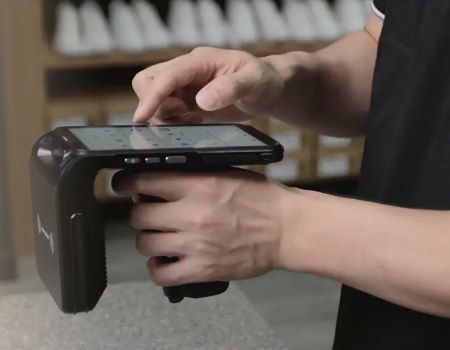
The drivers primarily use four key applications, including a critical custom-built inventory management app.
Before implementing MDM, the company faced significant pain points:
- Manual updates for their custom app were tedious and often delayed, leading to inconsistent software versions across devices.
- Device misuse was a concern, as drivers could access non-work-related apps, impacting productivity and battery life.
- Troubleshooting issues on dispersed devices required drivers to return to the office, causing costly downtime.
MDM Solution Implemented
The company adopted AirDroid Business to address these challenges. The solution was deployed across their fleet of Chainway handheld scanners. Specifically, they leveraged two core features: Kiosk Mode and App Management System (AMS).
Kiosk Mode was configured to lock down each device, restricting access solely to the four essential work applications, including their custom inventory app.
The AMS was used to centrally manage and push updates for all applications, ensuring every device ran the latest versions without manual intervention.
Remote monitoring and support features were also set up to provide real-time visibility and troubleshooting capabilities.
Tangible Results & Benefits
- Productivity Jump: Kiosk Mode eliminated off-task use, boosting driver focus. Scanning efficiency increased by 12%, order throughput rose 8%.
- Downtime & Cost Slashed: AMS automated updates, reducing update time by 90% and saving 40+ IT hours/month.Remote troubleshooting cut on-site support needs by 75% and reduced average device recovery time by 45 minutes
- Enhanced Security & Control: Kiosk Mode prevented unauthorized apps/settings, securing corporate data and ensuring device use strictly for work
- Streamlined Management: IT gained true centralized control, cutting device provisioning/configuration time by 70% and simplifying maintenance across vast spaces.


Leave a Reply.