Android Hotspot Control Native Settings vs. MDM Solution
Why should businesses prioritize Android hotspot control?
With the widespread adoption of Android devices in enterprises (from retail POS terminals and field tablets to healthcare devices), managing hotspot functionality has become a critical aspect of enterprise cybersecurity and asset management.
This is where Android hotspot control comparison becomes essential for making informed decisions. Uncontrolled hotspot usage can lead to risks such as data breaches, compliance violations, and resource waste. Enterprises typically face two choices when it comes to hotspot management: relying on native Android system settings or deploying a Mobile Device Management (MDM) solution.
While native setups may seem "zero-cost," they suffer from fatal flaws such as coarse control and a lack of auditing capabilities. These Native Android control limitations often leave security gaps. MDM solutions, though requiring investment, offer refined, compliant, and trustless comprehensive management.

This article will compare the two from three core dimensions: control granularity, audit traceability, and zero-trust execution, helping companies choose a management solution better suited to their business needs, essentially a comprehensive MDM vs native settings evaluation.
Upgrade Android Hotspot Control to Enterprise‑Grade with AirDroid Business
Stop relying on “on/off” native settings. AirDroid Business delivers role‑, time‑, and location‑based policies, centralized remote management, and real‑time compliance controls—reducing data waste and closing security gaps.
- 1 : Dimension 1: Granularity of Control – From “On or Off” to “Scenario-Based Precise Authorization”
- 2 : Dimension Two: Audit and Traceability Capabilities – From “Untraceable” to “Full Evidence of Operations”
- 3 : Dimension Three: Zero-Trust Execution – From “Default Trust” to “Strict Verification”
- 4 : Enterprise Selection Guide: Native Setup vs. MDM - Which to Choose?
Dimension 1: Granularity of Control – From “On or Off” to “Scenario-Based Precise Authorization”
The core requirement of hotspot control is to "block unauthorized use while meeting reasonable business scenarios." The difference in granular policy control between native settings and MDM directly determines whether the control effect can match the complex needs of enterprises.
Android's native settings: rigid, one-size-fits-all control
The hotspot settings built into the Android system can only meet the basic needs of individual users and are completely unsuitable for enterprise-level management scenarios. These Native Android control limitations show up in two major ways:
Functional limitations: Only has two states: "on" and "off".
In the default settings, the hotspot function only offers two options: "Enable" or "Disable," lacking any intermediate access control:
- Once enabled, any device (including unfamiliar phones and unauthorized computers) can connect via password, making it impossible to restrict "who can connect".
- Usage conditions cannot be set, such as "Allow use only during work hours" or "Allow use only in specific areas," resulting in permissions being either completely open or completely blocked.
- There are no data usage limits, allowing employees to use the company devices' hotspots to download large files, exceeding data limits.
Operational dependency: Physical contact with the equipment is required.
Native hotspot control relies entirely on "local manual operation":
- To disable a field employee's tablet hotspot, the IT team must contact the employee on-site or wait for the device to be retrieved, with response delays potentially lasting several days;
- For POS terminals in retail stores and tablets in logistics vehicles distributed nationwide, unified remote management is impossible, contradicting the need for an Android device centralized management tool.
- Employees may reactivate hotspots without the IT team's knowledge, creating a vicious cycle of "control-violation-re-control".
A chain convenience store attempted to control POS terminal hotspots using native settings and found that 30% of store employees were enabling hotspots for personal use, resulting in monthly data traffic overage costs exceeding 50,000 yuan, and multiple instances of customer payment information being leaked after personal devices were connected.
MDM Solution: Scenario-based Licensing Based on Multiple Dimensions
MDM solutions, exemplified by AirDroid Business, break through the limitations of native settings, enabling refined control over "who can use it, when to use it, and where to use it, This aligns with enterprise-grade Identity-based permission control expectations.
User-based access control
MDM (Management Data Management) tightly binds hotspot permissions to employee roles, ensuring "the right person uses the right permission":
- For field engineers: Grant "temporary hotspot permissions," requiring an application and explanation of the business scenario (e.g., "data synchronization at remote construction sites"). Permissions take effect after IT approval.
- For frontline retail staff: Hotspots are disabled by default, allowing only connections via company Wi-Fi to prevent personal use.
- For administrators: "Automatic permission synchronization" is enabled. Hotspot permissions are immediately revoked upon employee departure or reassignment to prevent permission remnants. This avoids risks caused by the Mandatory device function disabling being performed manually and inconsistently.
For example, a logistics company, using AirDroid Business, only grants hotspot permissions to driver tablets used for inter-provincial transport (requiring route data synchronization), disabling all other office devices. This reduced the hotspot violation rate from 40% to 0.
Time-based dynamic control
Supports setting "Hotspot Usage Time Window" to prevent permission abuse:
- Remote Workers: Hotspots are only allowed to be used from 9:00 to 18:00 on weekdays and will be automatically disabled after getting out of work to prevent non-work use at night.
- Temporary Project Teams: Hotspots are enabled for devices within the project period (e.g., 1 month). Permissions will automatically expire after the project ends, requiring no manual intervention.
Location-based intelligent adaptation
By leveraging geofencing technology, the system enables "opening hotspots only where needed":
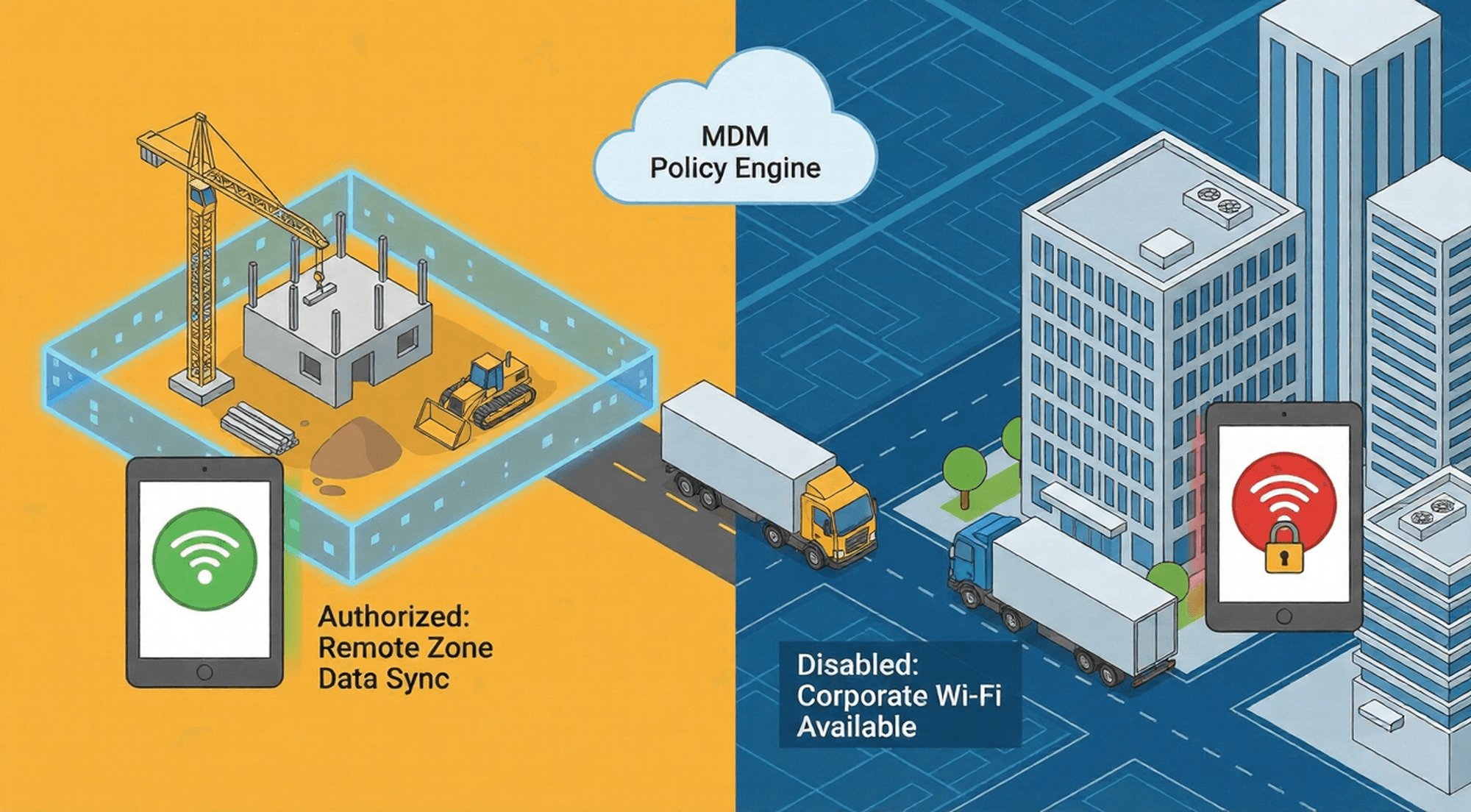
- Construction companies: Hotspots are automatically enabled only when devices enter a construction site without company Wi-Fi coverage; they are immediately disabled upon leaving the site.
- Chain pharmacies: Hotspots are disabled within stores with company Wi-Fi; however, pharmacists' tablets automatically unlock hotspot access when providing community services (in areas without Wi-Fi).
This "scenario-based authorization" satisfies essential business needs while avoiding the risks of indiscriminate access, and supports stronger device policy enforcement power.
Dimension Two: Audit and Traceability Capabilities – From “Untraceable” to “Full Evidence of Operations”
For businesses, especially those in regulated sectors (healthcare, finance, retail), "traceable usage of frequently accessed information" is a mandatory requirement for compliance audits. The difference in audit capabilities between native setups and MDM (Management Data Management) directly determines whether a company can pass compliance checks and respond to security incidents.

Android Native Settings: A "Blind Spot" in the Auditing Process
The native system does not provide hotspot usage logs at all, meaning there are no mobile device audit logs available for investigation.
No usage records are available.
The native settings cannot record the following critical information:
- When the hotspot was enabled/disabled and by whom;
- Which external devices are connected to the hotspot (device model, MAC address).
- Data flow during hotspot usage (upload/download volume, servers accessed).
In the event of a data breach, the IT team cannot trace whether it was caused by hotspot usage or which device was the source, which directly hinders compliance and violates device security compliance requirements.
Directly violates compliance requirements
GDPR, HIPAA, and PCI-DSS regulations all explicitly require that "enterprises must retain traceable records of network access to prove that data transmission is controllable." The native "no log" feature of these settings directly leads to compliance audit failures:
- Healthcare companies using native settings to manage nursing tablets cannot provide evidence that "patient data was not leaked via hotspots," potentially facing HIPAA fines of up to $1.5 million per instance;
- Retail companies' POS terminal hotspots lacking logs will be deemed "uncontrollable payment data transmission" during PCI-DSS audits, impacting their business qualifications.
A small hospital was once fined $800,000 and required to invest millions in rectification efforts because nurses were using nursing tablet hotspots to transmit patient medical records and could not provide usage records during a regulatory inspection.
Compliance‑Ready, Auditable Hotspot Management
Capture immutable, encrypted logs for every permission change and operation—who, when, which device, and what action. Export records to support GDPR, HIPAA, and PCI‑DSS audits across healthcare, finance, and retail.
MDM Solution: A Compliance-Oriented End-to-End Audit System
The MDM solution is designed with "operational evidence retention" as its core objective, automatically recording key operations related to hotspot control to form a traceable chain of evidence, meeting the enterprise's compliance and basic traceability needs. MDM provides detailed mobile device audit logs, including:
Log content: Focus on core operation records
AirDroid Business's audit logs focus on recording key operational steps in hotspot control to ensure traceability of core behaviors:
Permission Operation Records: Time when hotspot functions are enabled/disabled, operator identity (IT administrator/authorized employee), and operating terminal (management backend/employee app).
Permission Change Records: Records of policy changes such as granting, revoking, and adjusting the duration of hotspot permissions (e.g., "On October 20, 2025, grant employee A's tablet a 1-week hotspot permission").
Device Association Records: Unique identifiers (device ID, serial number) of the enterprise device corresponding to the operation, ensuring accurate binding between the operation and the specific device.
Log Management: Encrypted Storage and Compliance Adaptation
To meet core audit requirements, MDM logs possess the following key characteristics:
Encrypted storage and immutability:
Logs are stored in an encrypted format in the cloud, viewable only by system administrators. They support retrieval by operator, time, device, and other dimensions, and cannot be manually deleted or modified, ensuring the authenticity and completeness of the records.
Compliance adaptation support:
Logs can be used in conjunction with enterprise compliance processes. Basic records can be exported from the backend (currently, the export process requires following system instructions and does not support rapid export of multiple formats), providing auditing agencies with core evidence that "hotspot operations are under control."
In a GDPR audit, a cross-border e-commerce company used AirDroid Business's operation logs to clearly demonstrate that "all hotspot activation operations were approved by IT, and permission changes were clearly recorded," effectively proving the company's control over hotspot usage, successfully passing the audit, and avoiding compliance risks caused by a lack of records.
Security incidents: Assisting in shortening the investigation cycle
When security incidents related to hotspots occur (such as data breaches or abnormal access), MDM logs can provide crucial clues for investigation and help pinpoint the scope of the problem.
For example, after discovering a customer information breach, a financial company quickly identified the issue by filtering "hotspot operation records during the breach period" in AirDroid Business logs: Employee B's work phone had activated a hotspot between 14:00 and 15:00 on October 15th, and this operation was initiated by the employee himself.
Based on this clue, the IT team further investigated by combining device usage records and network access logs, clarifying the scope of the risk and completing the handling within 1-2 business days. Compared to the blind investigation with "no traces" under the original settings, this significantly shortened the response time.
Dimension Three: Zero-Trust Execution – From “Default Trust” to “Strict Verification”
"Zero Trust Security Architecture" has become the mainstream concept in enterprise network security. Its core is "Never Trust, Always Verify." Any access request (including hotspot access) must undergo strict verification, rather than being allowed by default. This includes hotspot usage, especially when considering zero trust device access frameworks. The difference between native settings and MDM in their ability to implement zero trust determines the security level of enterprise hotspot management.

The core connection between zero trust and hotspot control
Hotspot usage essentially involves "external devices accessing the network through enterprise equipment," which raises two major risks:
- The external device may be an unauthorized "risky terminal" carrying malware;
- Data transmitted via hotspot may bypass enterprise security protections (such as VPNs and firewalls).
The zero-trust principle requires: "Never trust any hotspot usage request by default; its legitimacy must be verified through multi-dimensional validation." This is precisely the core requirement for enterprise hotspot management.
Android's native settings: a stumbling block to the implementation of zero trust.
The native settings use a "default trust" logic, which completely contradicts zero trust and cannot meet enterprise security needs.
Default allow: No security baseline
The default setting does not include "disable hotspot." Employees can directly enable hotspots after a new device is activated, without any approval or verification. This "default open" mode violates the core principle of zero trust, which is to "deny all access by default," essentially leaving an unprotected backdoor for the corporate network.
Lack of verification mechanism: Identity and scenario out of control
The native settings do not verify the legitimacy of the "person, device, and scenario" used for hotspot usage:
- If an employee's account is stolen, attackers can directly activate the hotspot without secondary verification.
- If a device is taken out of the company premises (e.g., lost or stolen), the finder can freely activate the hotspot and access external networks to steal data. This means enterprises cannot achieve zero trust device access using native tools.
- It cannot verify whether it is a genuine business need; employees may activate the hotspot under the pretext of "work needs" but actually use it for personal entertainment.
MDM Solution: The "Core Execution Tool" for Zero-Trust Hotspot Control
MDM, with its core principle of "default distrust and strong verification throughout the process," implements the zero-trust concept in every aspect of hotspot management, ensuring that every hotspot use is legal and compliant.
Disabled by default: The first line of defense against zero trust
AirDroid Business sets a security baseline of "hotspot disabled by default" for all enterprise Android devices. The hotspot function is automatically locked when a new device joins the network, and only IT administrators can unlock it through the backend. This setting fully complies with the "default denial" requirement of zero trust, blocking unauthorized hotspot use at the source.
Dynamic authorization: multi-dimensional verification of legitimacy
When employees request hotspot access, MDM verifies the legitimacy of the scenario through "multi-factor authentication," rather than a single approval:
- Identity Verification: Confirms that the applicant is a current employee of the company and that their role meets the permission requirements (e.g., only field staff can apply).
- Scenario Verification: Confirms through geolocation and business system data that the employee is indeed in a work scenario without corporate Wi-Fi (e.g., logistics vehicles on remote routes, medical personnel providing community services).
- Device Verification: Checks whether the requesting device is a compliant corporate device (not rooted, with security software installed) to prevent risky devices from abusing hotspot access.
Only after all verifications pass will temporary hotspot access be granted, and the scope of access (time, traffic) will match the scenario to avoid "over-authorization."
Continuous monitoring: Verification is not relaxed even after authorization.
Zero Trust emphasizes "continuous verification," not "one-time authorization, lifetime trust." After a hotspot is enabled, MDM monitors the following in real time to ensure risks are controllable:
- Connected Devices: Only devices registered during the application process are allowed to connect. Any attempt by an unknown device to connect is immediately blocked, triggering an alarm and simultaneously notifying the IT team.
- Data Traffic: If abnormal traffic is detected (e.g., downloading 20GB within 1 hour), a traffic anomaly alert is triggered in real time, sending a notification to the IT team. The administrator then determines whether to manually suspend the hotspot based on business needs.
- Scenario Changes: If a device leaves the authorized area (e.g., returning from a construction site to a Wi-Fi-enabled office), the hotspot is automatically disabled without manual intervention.
A financial company, through AirDroid Business's "continuous monitoring," discovered that an employee had enabled a hotspot outside of work areas with unknown devices connecting. The system immediately triggered an alarm and notified the IT team. The administrator remotely disabled the hotspot within 5 minutes, preventing the risk of customer account data leakage.
This architecture fully aligns with enterprise-grade zero trust device access methodologies.
Enterprise Selection Guide: Native Setup vs. MDM - Which to Choose?
Suitable only for scenarios using native Android settings
Native setups are only suitable for very small-scale scenarios with "few devices, no sensitive data, and no compliance requirements":
- Device Scale: Fewer than 10 Android devices in the enterprise, concentrated in the same office area;
- Business Needs: No fieldwork or remote work; devices are used only in the enterprise's Wi-Fi environment;
- Compliance Requirements: Does not involve regulated data such as customer privacy, payment data, or medical information (e.g., 1-2 POS terminals in a small individual shop).In these scenarios, the "zero-cost" advantage of native setups can cover the needs, but certain security risks must be assumed (e.g., exceeding data limits, minor data leakage).
Scenarios where an MDM solution must be chosen
For the following three types of enterprises, MDM is a "must-have" option for hotspot management, with no alternative:
Enterprises managing distributed devices
- Retail chains (POS terminals in over a hundred stores), logistics companies (hundreds of field tablets), construction companies (construction site equipment), etc.
- Core need: Achieve remote, unified management and control, avoiding "management blind spots caused by dispersed equipment".
- The value of AirDroid Business: Supports batch management of thousands of devices, eliminating the need for on-site operation and reducing management costs by 90%.
Companies in regulated industries
- Healthcare (HIPAA), Financial (PCI-DSS), Cross-Border Enterprises (GDPR), etc.
- Core Needs: Meeting compliance audit log requirements to avoid fines and business shutdowns;
- AirDroid Business's Value: Providing encrypted, exportable audit logs that directly meet regulatory requirements with a 100% pass rate.
Enterprises implementing zero-trust security architecture
- Enterprises that prioritize cybersecurity and have already deployed a zero-trust system (such as firewalls and identity authentication systems).
- Core requirement: Ensure that hotspot management is consistent with the zero-trust policy, eliminating security vulnerabilities.
- The value of AirDroid Business: "Default disabling, dynamic verification, and continuous monitoring".
Conclusion
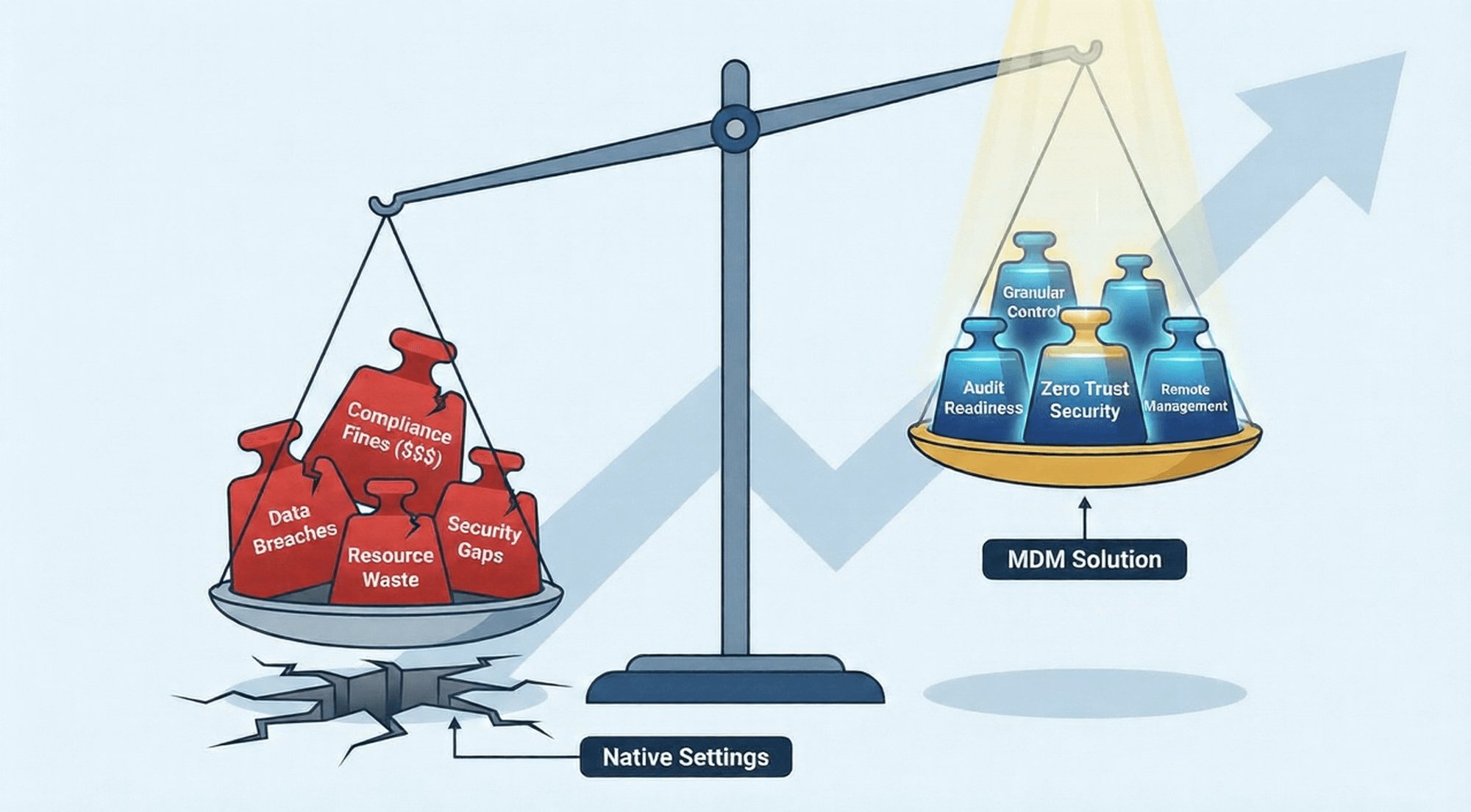
MDM is the inevitable choice for enterprise Android hotspot management.
Android's native hotspot settings are essentially "simple tools" designed for individual users, and cannot meet the core needs of enterprises in terms of "refined control," "compliance auditing," and "zero-trust security." If enterprises blindly rely on native settings, they may face risks such as data leaks, compliance fines, and waste of resources.
Zero‑Trust Hotspot Control Built for Enterprises
Default deny, dynamic authorization, and continuous monitoring bring hotspot usage into your zero‑trust loop. AirDroid Business verifies identity, scenario, and device compliance before, during, and after every session.



Leave a Reply.