[2025Update] How to Mirror A Phone to Another Phone?
What happens when you want to share your phone's screen with someone else, but you're not near a TV or computer? How can you mirror your phone's screen to another phone in real-time, whether it's for work, play, or just to show off something cool?
While this might seem like a complex task, there are simple solutions available. By using the right apps, you can easily share your phone's screen with others. Follow the guide below, and let's start!

- Implementation Method: Most tools require installing client software on both devices and establishing a connection via the same Wi-Fi or internet to achieve the mirroring effect.
- Privacy and Security:Typically, mirroring can only begin after explicit authorization from the sender. If a lost or unlocked device is physically accessed by someone else and permissions are granted, it may pose a security risk.
Part 1. How to Mirror Android to Android?
You can't mirror Android to Android using native Android screen mirroring. It's mainly used to cast to TVs or computers. However, you can use third-party apps to mirror one Android device to another.There are other screen mirroring tools that help stream Android to Android when the two Android devices connect to the same Wi-Fi network.
Way 1: Mirror Android to Android via Screen Stream Mirroring
This tool has got much importance due to its extraordinary features. Screen sharing with different media players is made possible using this app. You can share the screen with web browsers too.
You can also record your audio and videos using this Android screen mirroring app. It works well even when connected through Wi-Fi, Bluetooth, or even the USB.
- Step 1.Download Screen Stream Mirroring on your Android devices.
- Step 2.Now launch the app and choose "Media Players" from the application menu on your sending device.
- Step 3.Keep in mind that you will also have to use a media player app that is supported by RTSP streams on the target device.
- Step 4.Then the two Android devices will start to connect automatically.
Way 2: Mirror Android to Android via ScreenShare
ScreenShare is also an authentic app for Android screen sharing purposes. It can facilitate you to control other devices and resolve their issues. The unique features for which this application can be used are remote controlling, support, assistance, and remote desktop.
One can share the screen with another person using this app. When you start it, it may ask you two possibilities, and you have to choose any one of them. The one option is to become a distributor and the second one is to become a helper.
- Step 1.Launch Google Play Store on your Android devices to install ScreenShare.
- Step 2.Launch the app.
- Step 3.Turn on Bluetooth for both Android devices, and connect them via Bluetooth by going to the phone Settings > Device Connection or Connection Preferences > Bluetooth.
- Step 4.Now open ScreenShare app on your Android, and go to Menu > ScreenShare service.
- Step 5.Set the wireless network as Bluetooth on the two devices.
- Step 6.Wait for a while and you will see a "Connected" popup.
Way 3: Mirror Android to Android via TeamViewer
TeamViewer, is an overall answer for far-flung support, far-flung access, and online conferences, which lets you help clients remotely, collaborate with colleagues from a distance, and additionally live related together along with your gadgets or help pals and own circle of relatives members.
How to use TeamViewer to mirror Android to Android:
- Step 1.Download and install TeamViewer Quick Support on the sending device.
- Step 2.Launch the app and you will see your ID.
- Step 3.Download and install TeamViewer on the receiving device.
- Step 4.Launch the app and sign in with your TeamViewer account.
- Step 5.Now enter Partner ID from the sending device.
Part 2. How to Mirror iPhone to iPhone?
Many people assume that they can use AirPlay to mirror iPhone to iPhone.But in fact,AirPlay does not support screen mirroring options from iPhone to iPhone. Because AirPlay is a built-in feature of the iPhone and other Apple devices sunch as smart TV or Mac. In order to mirror iPhone to iPhone, you have to rely on another method such as third-party tools like AirDroid Cast.
AirDroid Cast allows you to mirror iPhone to another iPhone or iPad easily:
- Step 1.Download and install AirDroid Cast from App Store on both iPhone devices.
- Step 2.On the iPhone that receives the screen cast, tap "Receive Screen Cast".
- Step 3.On the iPhone that initiates the screen cast, scan the QR code or enter the Cast Code.
- Step 4.Accept the request and tap "Start Broadcast".
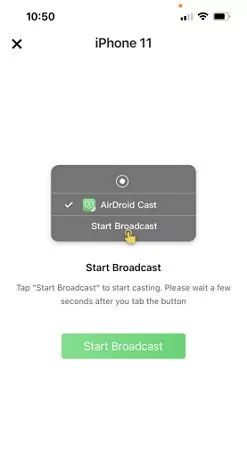
Now you can mirror iPhone to iPhone without any hassles.
Check this video to know how to mirror iPhone to iPhone:
In addition to AirDroid Cast, you can mirror iPhone to iPhone using apps like ApowerMirror, LetsView, and AnyViewer.The following section will use ApowerMirror as an example to detail the steps for mirroring iPhone to iPhone.Before starting, connect both iPhone to the same Wi-Fi network.
- Step 1.Download and install ApowerMirror on your iPhone devices. Then launch the app.
- Step 2.On the iPhone that initiates the screen cast, tap the LocalCast button on your screen. Then it will start searching for the available devices.
- Step 3.On the device list, tap the name of another iPhone.
- Step 4.Tap Start Broadcast to start mirroring.
Part 3. How to Mirror Android to iPhone or Vice Versa?
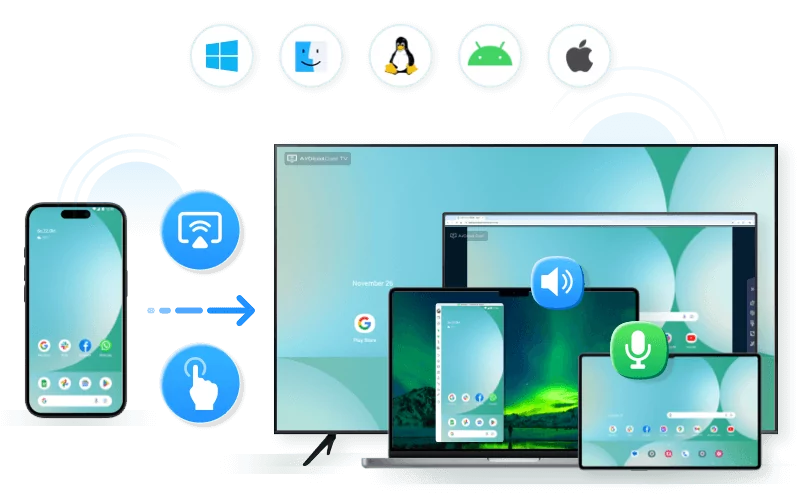
Sometimes, you may want to mirror Android to Android, and sometimes, you may want to mirror Android to another OS. No matter which operating system your phone is, AirDroid Cast is a perfect tool when mirroring a phone to another phone, as it works flawlessly on Android, iOS, Windows, and Mac. Therefore, you don't have to worry about the compatibility issue, and you don't have to switch the mirroring tools while mirroring between different OSes.
More importantly, AirDroid Cast support remote screen mirroring, which means you can not only mirror under the same Wi-Fi, but also mirror when the two devices connect to different network.
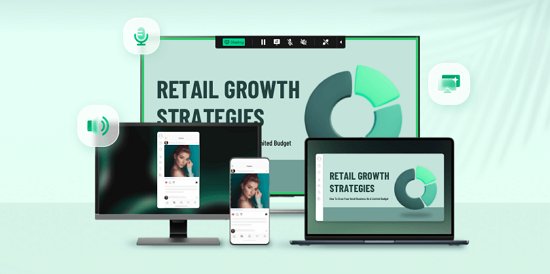
How to Mirror Android to iPhone or Vice Versa:
You can easily mirror Android to iPhone via AirDroid Cast. Note: the steps below work for mirroring Android to iPhone, but the method applies to mirroring iPhone to Android.
- Step 1.Download and install AirDroid Cast on both your Android and iPhone. Then launch the app on both devices.
- Step 2.On your iPhone (the receiving device), tap "Receive Screen Cast", and you will see a QR code and a Cast Code.
- Step 3.On your Android (the sending device), scan the QR code, or enter the Cast Code and tap "Start Casting".
- Step 4.Then a casting request will pop up on your iPhone. Accept the request.
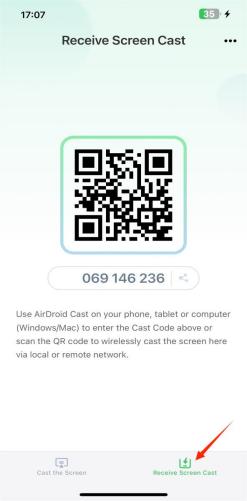
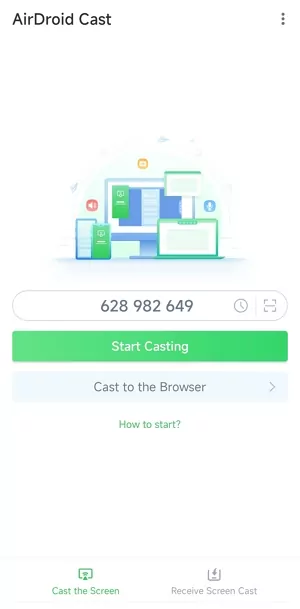
Voila! You can mirror Android to iPhone successfully.
Here is a video tutorial to mirror a phone to another phone:
Part 4. What Is the Best Screen Mirroring App for Phone to Phone?
We have discussed several applications that support us to mirror phone to another phone. But now, the question arises which one is the best of these applications?
We can easily judge now that AirDroid Cast is the best one if we compare its features with all the other apps we have discussed. It connects multiple devices, it is secure as many other apps have security concerns.
Moreover, this app helps you in making your presentations and sharing them with others. Connecting to other devices is also very compatible and you can connect using different means.
This tool supports different casting options:
- Android to Android;
- Android to iPhone;
- iPhone to iPhone;
- iPhone to Android;
- Phone to PC/TV
- PC to Phone;
- PC to PC;
- More...
| Application Name | Connection Methods | Free Usage Limitations | Supported Systems |
|---|---|---|---|
| AirDroid Cas | Wi-Fi, USB | Free with optional paid features | Android, iOS, Windows, macOS, Linux, ChromeOS, Smart TVs |
| ApowerMirror | Wi-Fi, USB | 10-minute trial, then subscription required | Windows, macOS, iOS, Android, Smart TVs |
| TeamViewer | Internet, Wi-Fi | Free for personal use, 14-day trial for commercial features | Android, iOS, Windows, macOS, Linux, ChromeOS |
| Screen Stream Mirroring | Wi-Fi, Chromecast | Free with ads | Android, Chromecast, VLC, Web Browsers |
| Screen Share | Not Available | Not Available | Not Available |
Part 8. Final Words
We hope that you have learned something new from this article and have found new or more practical solutions on how to mirror a phone to another phone. Mirroring phone to phone can be quite the game-changing solution, whether you are playing video games or watching movies. We have discussed several methods above. These are optional free and paid solutions, depending on your needs.
However, the best software that we recommend to mirror phone to another phone is AirDroid Cast as it comes with many convenient and simple to use.


返信を残してください。